Calcwright
An engineering calculation worksheet

Engineering calcs, written by the AI you already use.

Describe a beam, a column or a circuit. Your AI writes the calculation in Calcwright, a worksheet like Mathcad with live math and units, and draws the diagram from the same values. Change a value and the results, the drawing and the design checks all follow.

Calcwright doesn't include an AI. Connect Claude, Codex, Gemini CLI or Cursor, or type it all yourself.

The web version has every worksheet feature, free, with no AI connection.

Coming soon The desktop app, which your AI connects to: macOS first, Windows planned.

Show a run
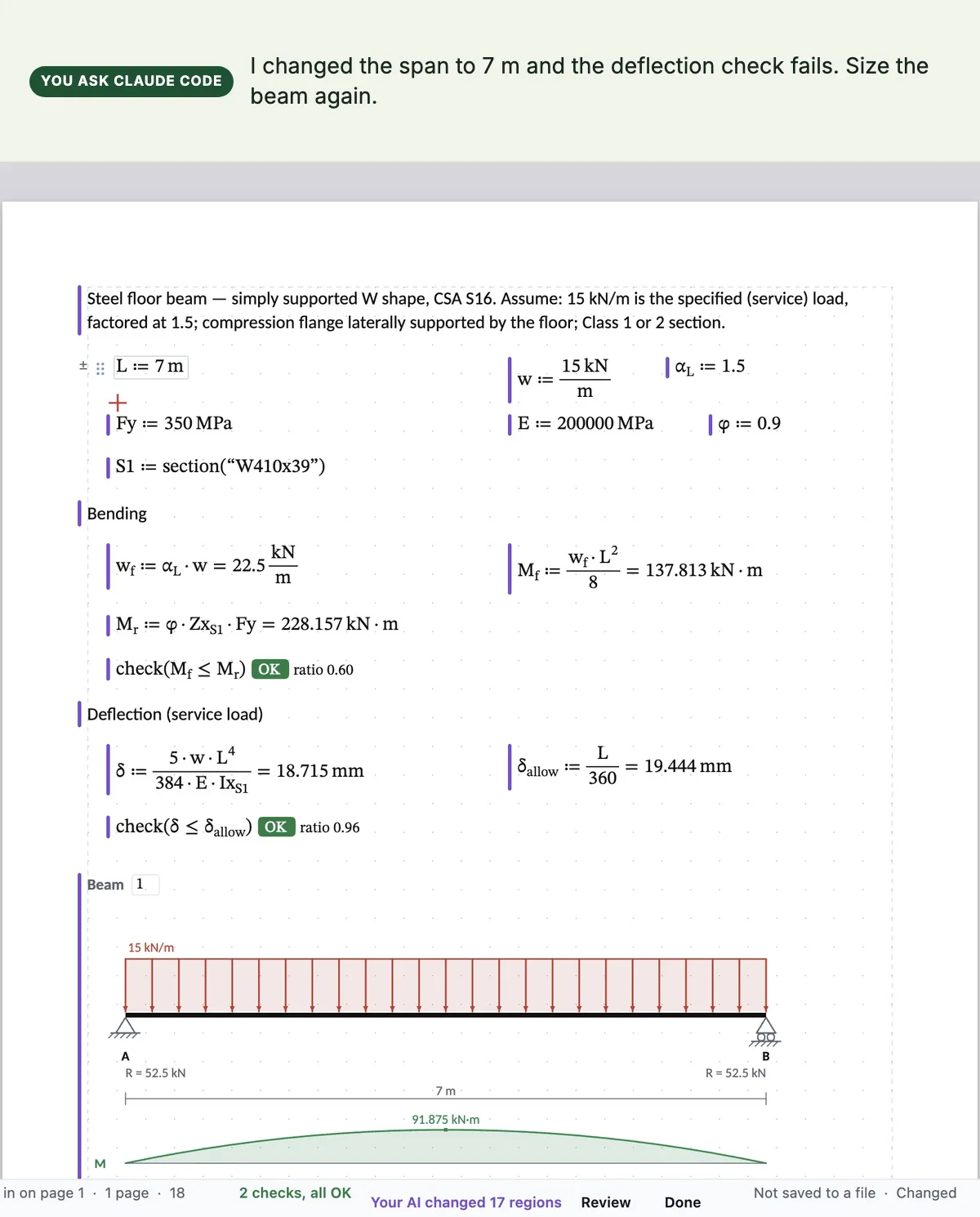
A steel floor beam check in Calcwright, written by Claude: a W410x39 over 7 m, bending and deflection checks marked OK, and the beam drawn with its loads and reactions
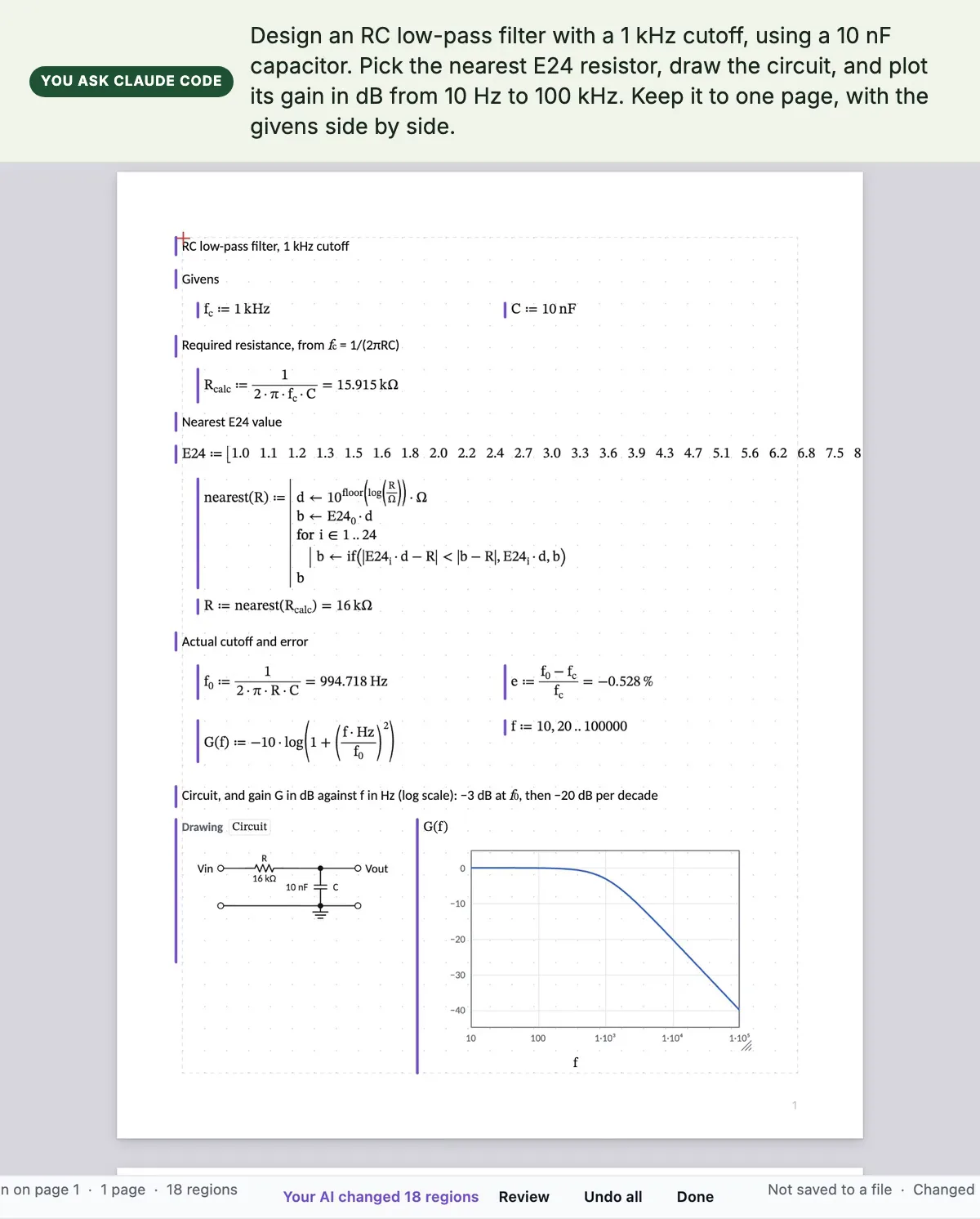
An RC low-pass filter in Calcwright, written by Claude: a 16 kΩ resistor picked from the E24 series for a 10 nF capacitor and a 1 kHz cutoff, the actual cutoff 994.7 Hz, the circuit drawn with its values, and the gain plotted in dB
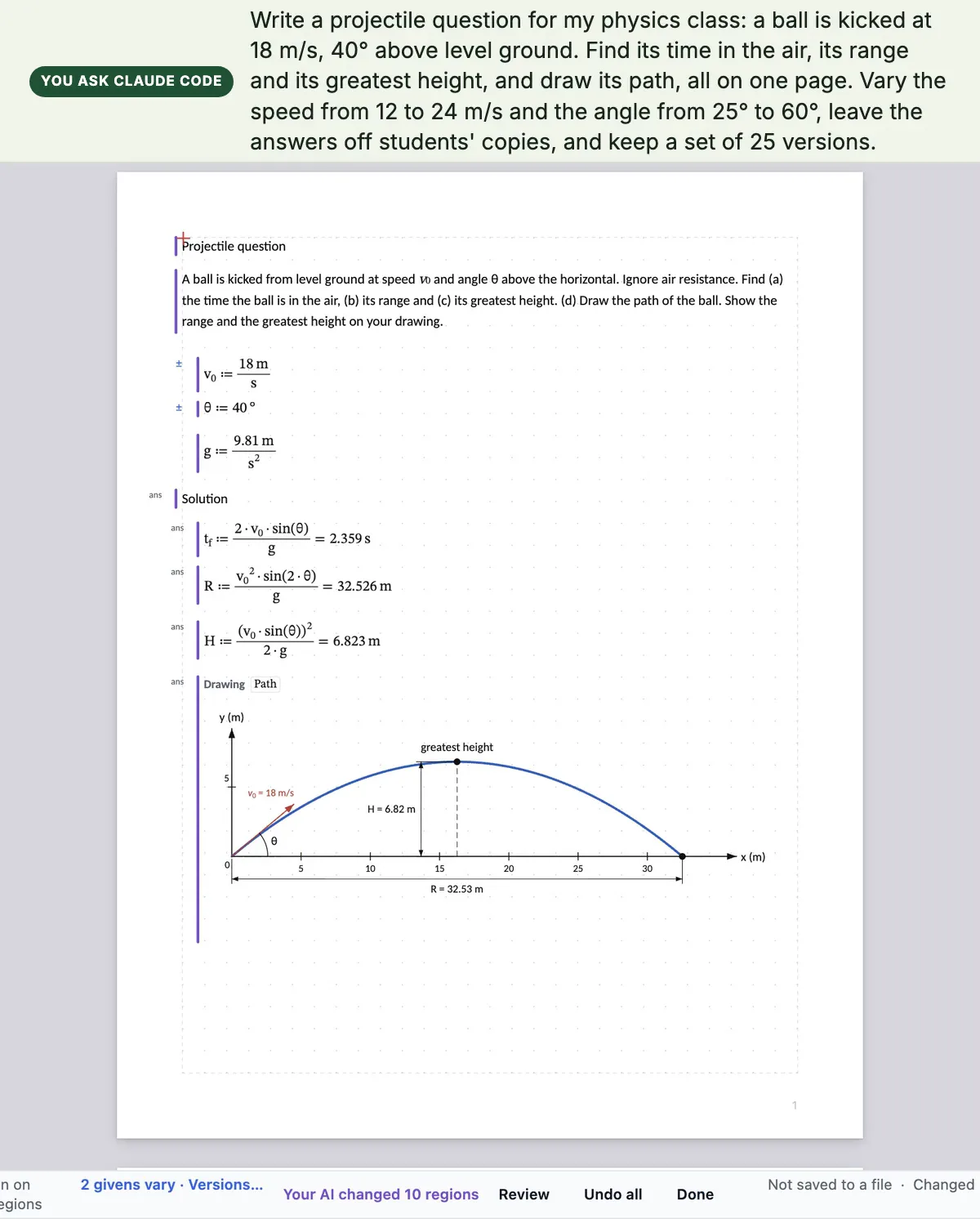
A projectile question in Calcwright, written by Claude for a physics class: the speed and angle marked to vary, the solution marked as answers, and the ball's path drawn with its range and greatest height
Real runs, recorded in Calcwright. The requests were typed into Claude Code, which worked the sheet over MCP and chose the values itself. The waits while it worked are shortened.
Who it is for

For the engineer who signs it, and the teacher who sets it.

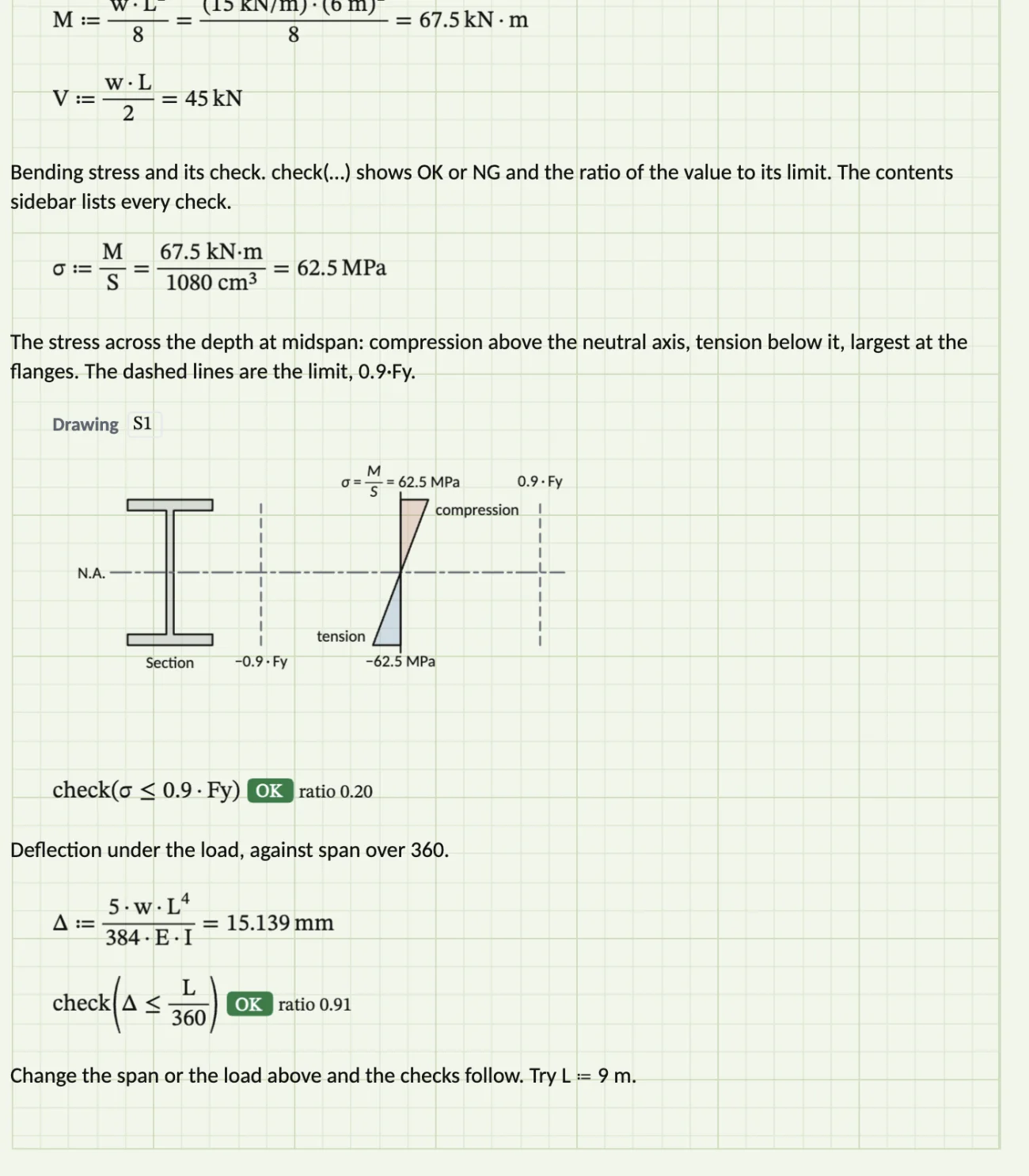
The working of a beam check shown in full, a drawing of the stress across the section, and two design checks marked OK with their ratios

Engineers: a calculation a checker can follow

  • Every value carries its units, so a unit slip is an error, not a wrong answer.
  • Design checks show OK or NG with their ratio, counted in the status bar.
  • Show the working: the formula, the values in their places, then the answer.
  • AISC and CSA steel shapes by name, and the lightest shape that passes every check.
  • Engineering paper with a title block, printed or saved as PDF.
Features for engineers

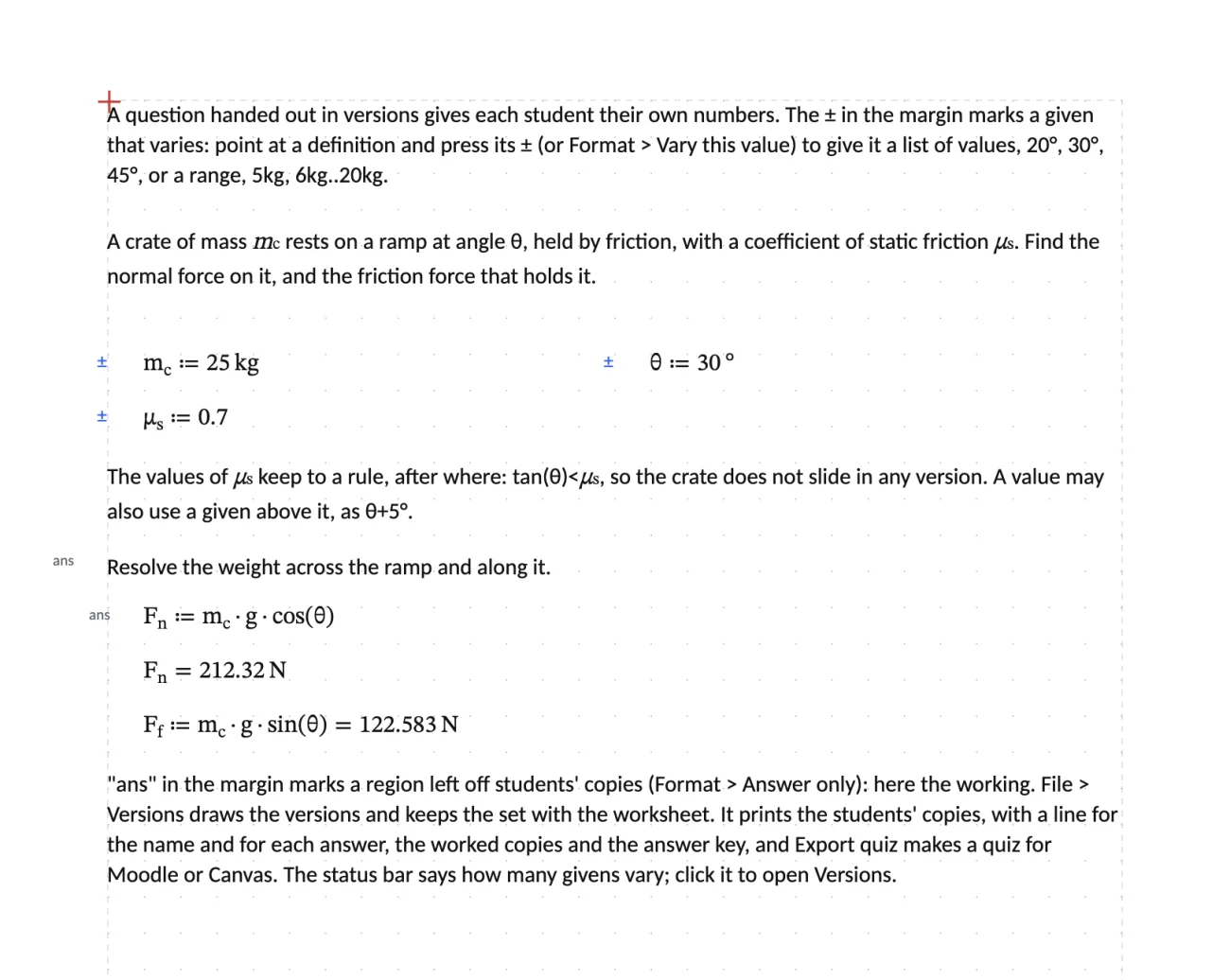
A question in versions: givens marked with ± in the margin, and the answers marked ans to leave off students' copies

Teachers: one question, other numbers for each student

  • Mark the givens that vary and the values they take.
  • Mark the answers to leave off students' copies.
  • Print students' copies, worked copies and the answer key, each with its diagram.
  • Export a quiz for Moodle or Canvas, each student with their own numbers.
  • It works without any AI. With one, ask it to make the versions.

Features for teachers

Or type it yourself

Math as you would write it on the pad.

You don't need an AI to use Calcwright. Click anywhere on the page and type. The math reads top to bottom, then left to right, as a sheet of hand calculations does.

You typeThe sheet showsWhat it is
L:6mL ≔ 6 mA definition, with its unit
w:15kN/mw ≔ 15 kN/mUnits go with the numbers
M:w*L^2/8=M ≔ w·L²/8 = 67.5 kN·mA result, in the unit that suits it
σ:M/S=σ ≔ M/S = 62.5 MPaUnits cancel and convert for you
check(σ<=0.9*Fy)check(σ ≤ 0.9·Fy) OKratio 0.20A design check, green OK or red NG
Drawings

Diagrams that follow the math.

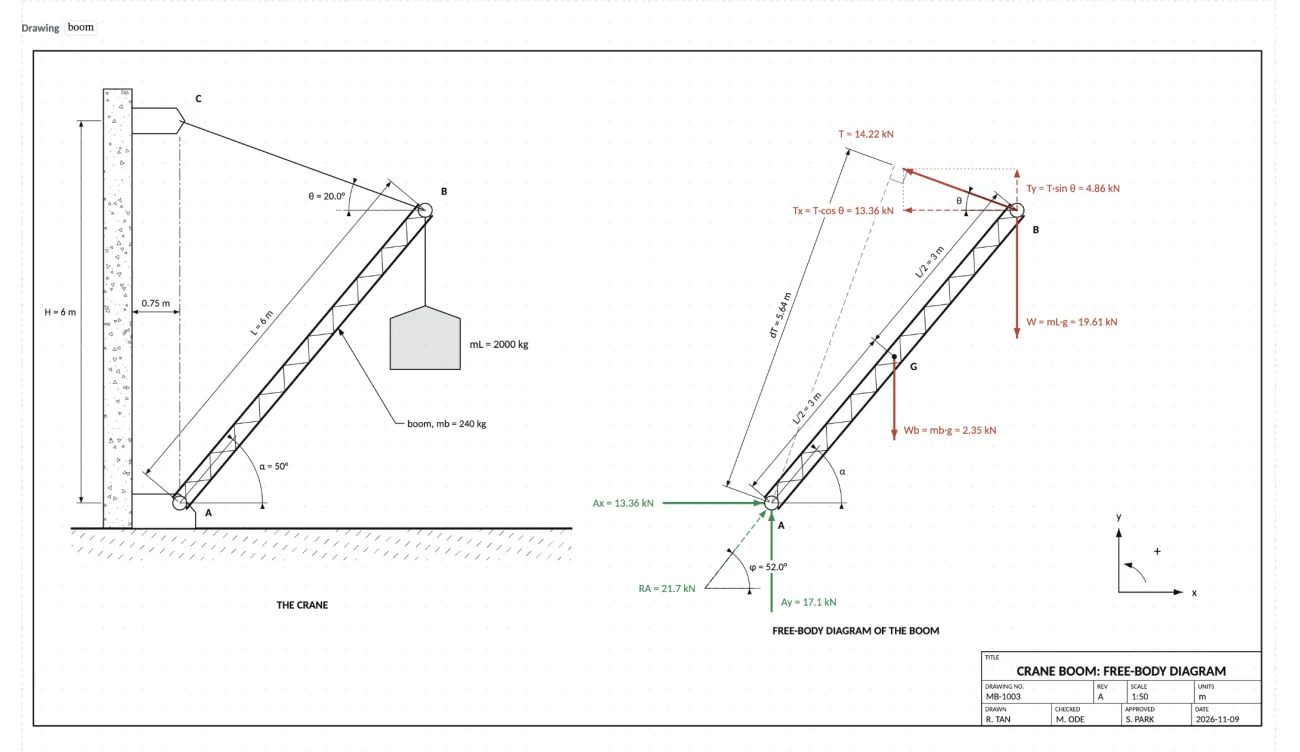
Every coordinate and size in a drawing is an expression read against the sheet above it. Change a value and the figure redraws, with its labels and dimensions. Free-body diagrams, sections, details, schematics and flowcharts are all drawings, and your AI can make them for you.

  • Ready-made figures from Insert → Figure
  • Drawn to scale, with values in the labels
  • Your AI sees its drawing as a picture, and corrects it
A drawing sheet of a crane boom and its free-body diagram, with the cable tension, pin reactions and loads labelled from the worksheet's values, and a title block
Bring your own AI

Use the AI you already have.

Calcwright doesn't come with an AI, and doesn't need one. Connect the AI app you already pay for, and it works the worksheet in front of you while you watch. Help → Connect your AI sets it up.

  • Claude Desktop
  • Claude Code
  • Codex
  • Gemini CLI
  • Cursor
  • VS Code
  • No account, no telemetry. Calcwright doesn't ask who you are or report how you use it.
  • Your files stay on your disk. Worksheets are .calcwright files where you save them. Calcwright never calls an AI service or sends your work anywhere.
  • Local only. Your AI app connects to Calcwright on your own computer, with a token. Web pages can't.

How to connect your AI

Ask in your own words

"Draw a free-body diagram of this." "Make versions of this question with answer keys." "Check this calculation." Ready-made prompts carry the method, so you don't need to know it.

It sees what you chose

Select a region or part of a drawing, and "fix this" or "label that angle" works without naming anything.

You review every change

What your AI made or changed keeps a violet bar until you have looked. One request is one step of Undo, so a wrong turn is one keystroke away.

Checked

Answers checked against someone else's.

Ten worked problems from the NIST Statistical Reference Datasets, the AISC Design Examples and NIST SP 811 put the published answer beside Calcwright's, with a check that they agree. And 32 exercises, each in 20 versions, are checked against separate solutions in Python with SymPy.

NIST StRD

Means, standard deviations and fits up to a tenth-degree polynomial, to 15 significant figures where a computer double allows.

AISC Design Examples

A W18x50 beam (F.1-1A) and a W14x132 column (E.1A), to the figures AISC publishes.

640 versions in Python

Every answer of every version, worked again from the problem statement by another method.

How the answers are checked

Questions

Questions people ask.

What is Calcwright?

An engineering calculation worksheet, in your browser and coming soon for macOS. You write math with units on a page, and it is worked out top to bottom, as hand calculations are. Results, plots, design checks and drawings follow when a value changes. It is like Mathcad, made to be written by your own AI as well as by you.

Does Calcwright include an AI?

No. Calcwright runs no AI model and never calls an AI service. You connect the AI app you already use, with your own account. You can also use Calcwright without any AI.

Which AI apps work with it?

Any AI app on your computer that takes MCP servers, such as Claude Desktop, Claude Code, Codex, Gemini CLI, Cursor and VS Code. Help → Connect your AI sets them up. An AI in a browser tab can't reach an app on your computer. How to connect

What does it cost?

Every worksheet feature is free. The AI connection is free for 14 days, then needs a license, bought once: $100 $79 USD at launch, for one person, on up to 3 computers, with every update included. Price

Does it need the internet?

The desktop app doesn't. Your worksheets are files on your computer, and the app goes online only to check a license key with Polar. Your AI app uses the internet to reach its own service. The web version needs the internet to open, and keeps your open worksheets in your browser. Privacy

Can it open Mathcad files?

No. Calcwright saves its own .calcwright files, and prints or saves PDF. To bring a calculation across, type it, or ask your AI to write it from the PDF or a picture of the page.

Which design codes does it check?

A design check is an inequality you write, such as check(σ<=0.9*Fy), so you choose the clauses of your code. Calcwright has the AISC and CSA steel section tables, and finds the lightest shape that passes every check.

When can I get it?

Now, in your browser, at worksheet.calcwright.app: free, with nothing to install, and no AI connection. The desktop app, which your AI connects to, is coming soon for macOS. Windows is planned.

Try it now, in your browser.

Every worksheet feature is free in the web version, with nothing to install. The desktop app, which your AI connects to, is coming soon for macOS. Windows is planned after macOS.